Kamis, 10 Desember 2020

MPLS Backbone

 MPLS Backbone


MPLS terdiri dari 3 jenis router yaitu :


1. Router P (Provider)

  • Terdapat dalam MPLS Domain, P router terhubung dengan router-router lain yang dimiliki service provider
  • Pada jaringan MPLS yang tidak terlalu besar terkadang tidak terdapat P router didalamnya untuk menghemat biaya.

2. Router PE (Provider Edge)

  • Merupakan router yang terhubung langsung dengan router customer dan juga sekaligus dengan router service provider
  • Menjembatani antara network berbasis IP dengan network berbasis MPLS
  • Memberikan pelabelan pada paket IP yang masuk ke dalam MPLS Domain
  • Melepas pelabelan pada paket yang akan keluar dari MPLS Domain
  • PE Router ini sifatnya harus ada pada setiap jaringan MPLS

3. Router CE (Customer Edge)

  • Merupakan router yang terdapat di sisi customer
  • Pada router CE ini tidak terdapat konfigurasi MPLS apapun
  • Konfigurasi routing biasa, bisa static atau dynamic seperti OSPF / EIGRP

Konfigurasi :

R1
R1#conf t
R1(config)#
R1(config)#ho PE-1
PE-1(config)#
PE-1(config)#int lo 0
PE-1(config-if)#ip add 10.10.10.1 255.255.255.255
PE-1(config-if)#
PE-1(config-if)#exit
PE-1(config)#
PE-1(config)#int g1/0
PE-1(config-if)#ip add 192.168.10.1 255.255.255.252
PE-1(config-if)#no sh
PE-1(config-if)#exit
PE-1(config)#


R2
R2(config)#ho P
P(config)#int lo 0
P(config-if)#ip add 10.10.10.10 255.255.255.255
P(config-if)#
P(config-if)#int g1/0
P(config-if)#ip add 192.168.10.2 255.255.255.252
P(config-if)#no sh
P(config-if)#exit
P(config)#
P(config)#
P(config)#int g2/0
P(config-if)#ip add 192.168.20.1 255.255.255.252
P(config-if)#no sh
P(config-if)#
P(config-if)#exit
P(config)#

Setelah itu coba kita test ping terlebih dahulu 

R1
PE1(config)#do ping 192.168.10.2
Type escape sequence to abort.
Sending 5, 100-byte ICMP Echos to 192.168.10.2, timeout is 2 seconds:
!!!!!
Success rate is 100 percent (5/5), round-trip min/avg/max = 3/15/28 ms


R2
P(config)#do ping 192.168.20.2
Type escape sequence to abort.
Sending 5, 100-byte ICMP Echos to 192.168.20.2, timeout is 2 seconds:
!!!!!
Success rate is 100 percent (5/5), round-trip min/avg/max = 18/22/27 ms


R3
PE-2#ping 192.168.20.1
Type escape sequence to abort.
Sending 5, 100-byte ICMP Echos to 192.168.20.1, timeout is 2 seconds:
!!!!!
Success rate is 100 percent (5/5), round-trip min/avg/max = 20/24/31 ms


Ok sudah bisa, setelah itu kita akan membuat dynamic routing ospf 

R1
PE1(config)#rou
PE1(config)#router ospf 1
PE1(config-router)#net 192.168.10.1 0.0.0.0 area 0
PE1(config-router)#net 10.10.10.1 0.0.0.0 area 0


R2
P(config)#router ospf 1
P(config-router)#net 192.168.10.2 0.0.0.0 area 0
P(config-router)#net 192.168.20.1 0.0.0.0 area 0
P(config-router)#net 10.10.10.10 0.0.0.0 area 0
P(config-router)#exit


R3
PE2(config)#router ospf 1
PE2(config-router)#net 192.168.20.2 0.0.0.0 area 0
PE2(config-router)#net 10.10.10.2 0.0.0.0 area 0

Setelah itu kita cek nih terlebih dahulu kemudian kita ping 


R1
PE1(config-router)#do sh ip route
 192.168.10.0/30 is subnetted, 1 subnets
C 192.168.10.0 is directly connected, GigabitEthernet1/0
 192.168.20.0/30 is subnetted, 1 subnets
O 192.168.20.0 [110/2] via 192.168.10.2, 00:23:14, GigabitEthernet1/0
 10.0.0.0/32 is subnetted, 3 subnets
O 10.10.10.10 [110/2] via 192.168.10.2, 00:23:14, GigabitEthernet1/0
O 10.10.10.2 [110/3] via 192.168.10.2, 00:09:00, GigabitEthernet1/0
C 10.10.10.1 is directly connected, Loopback0


R2
P(config)#do sh ip rou
 192.168.10.0/30 is subnetted, 1 subnets
C 192.168.10.0 is directly connected, GigabitEthernet1/0
 192.168.20.0/30 is subnetted, 1 subnets
C 192.168.20.0 is directly connected, GigabitEthernet2/0
 10.0.0.0/32 is subnetted, 3 subnets
C 10.10.10.10 is directly connected, Loopback0
O 10.10.10.2 [110/2] via 192.168.20.2, 00:06:20, GigabitEthernet2/0
O 10.10.10.1 [110/2] via 192.168.10.1, 00:23:11, GigabitEthernet1/0


R3
PE2#show ip route
 192.168.10.0/30 is subnetted, 1 subnets
O 192.168.10.0 [110/2] via 192.168.20.1, 00:17:40, GigabitEthernet1/0
 192.168.20.0/30 is subnetted, 1 subnets
C 192.168.20.0 is directly connected, GigabitEthernet1/0
 10.0.0.0/32 is subnetted, 3 subnets
O 10.10.10.10 [110/2] via 192.168.20.1, 00:17:40, GigabitEthernet1/0
C 10.10.10.2 is directly connected, Loopback0
O 10.10.10.1 [110/3] via 192.168.20.1, 00:17:40, GigabitEthernet1/0


R1
PE1(config)#do ping 10.10.10.1
Type escape sequence to abort.
Sending 5, 100-byte ICMP Echos to 10.10.10.1, timeout is 2 seconds:
!!!!!
Success rate is 100 percent (5/5), round-trip min/avg/max = 4/11/20 ms


R2
P(config)#do ping 10.10.10.2
Type escape sequence to abort.
Sending 5, 100-byte ICMP Echos to 10.10.10.2, timeout is 2 seconds:
!!!!!
Success rate is 100 percent (5/5), round-trip min/avg/max = 20/26/31 ms


R3
PE-2#ping 10.10.10.10
Type escape sequence to abort.
Sending 5, 100-byte ICMP Echos to 10.10.10.10, timeout is 2 seconds:
!!!!!
Success rate is 100 percent (5/5), round-t

Sekarang kita buat konfigurasi MPLS nya 

R1
PE1(config)#mpls ip
PE1(config)#int g1/0
PE1(config-if)#mpls ip
PE1(config-if)#exit


R2
P(config)#mpls ip
P(config)#int g1/0
P(config-if)#mpls ip
P(config-if)#int g2/0
P(config-if)#mpls ip


R3
PE2(config)#mpls ip
PE2(config)#int g1/0
PE2(config-if)#mpls ip

Sekarang kita coba lihat MPLS nya apakah sudah aktif 

R1
PE1(config)#do sh mpls forwarding
Local Outgoing Prefix Bytes Label Outgoing Next Hop
Label Label or VC or Tunnel Id Switched interface
16 17 10.10.10.2/32 0 Gi1/0 192.168.10.2
17 Pop Label 10.10.10.10/32 0 Gi1/0 192.168.10.2
18 Pop Label 192.168.20.0/30 0 Gi1/0 192.168.10.2

R2
P(config)#do sh mpls forwarding
Local Outgoing Prefix Bytes Label Outgoing Next Hop
Label Label or VC or Tunnel Id Switched interface
16 Pop Label 10.10.10.1/32 762 Gi1/0 192.168.10.1
17 Pop Label 10.10.10.2/32 1016 Gi2/0 192.168.20.2

R3
PE2(config)#do sh mpls forwarding
Local Outgoing Prefix Bytes Label Outgoing Next Hop
Label Label or VC or Tunnel Id Switched interface
16 16 10.10.10.1/32 0 Gi1/0 192.168.20.1
17 Pop Label 10.10.10.10/32 0 Gi1/0 192.168.20.1
18 Pop Label 192.168.10.0/30 0 Gi1/0 192.168.20.1

Selasa, 08 Desember 2020

Backup Config Multiple Device

 Backup Config Multiple Device


Supaya seluruh device bisa di automasi, kita harus menambahkan link management ke ubuntu 


Ubuntu

root@NetworkAutomation-1:~#nano

backupmultiple.py root@NetworkAutomation1:~# cat backupmultiple.py import paramiko

import time

ip_list = ["192.168.10.2","192.168.10.3",

 "192.168.10.4","192.168.10.5"]

username = "cisco"

password = "cisco123"

ssh_client = paramiko.SSHClient()

ssh_client.set_missing_host_key_policy(paramiko.AutoAddPolicy())

for ip_address in ip_list:

ssh_client.connect(hostname=ip_address,

 username=username,

 password=password)

print "Success login to {0}".format(ip_address)

conn = ssh_client.invoke_shell()

conn.send("terminal length 0\n")

conn.send("show run\n")

time.sleep(4)

output = conn.recv(65535)

output_file = open("{0}.cfg".format(ip_address), "w")

output_file.write(output)

output_file.close()

print "Config in {0} saved!!\n".format(ip_address)

ssh_client.close()


Script ini  hanya berfungsi menambahkan list IP Address dari seluruh router dan melakukan looping di list tersebut. 


Ubuntu

root@NetworkAutomation-1:~# python backupmultiple.py

Success login to 192.168.10.2

Config in 192.168.10.2 saved!!


Success login to

192.168.10.3 Config in

192.168.10.3 saved!!


Success login to 192.168.10.4

Config in 192.168.10.4 saved!!


Success login to 192.168.10.5

Config in 192.168.10.5 saved!!


Sekarang kita bisa lihat bahwa konfigurasi seluruh device nya sudah dibackup ,maka sekarang kita cek


Ubuntu

root@NetworkAutomation-1:~# ls | grep .cfg

192.168.10.2. cfg

192.168.10.3. cfg

192.168.10.4. cfg

192.168.10.5. cfg


Sekarang kita akan coba lihat isi dari salah satu file tersebut.


Ubuntu

root@NetworkAutomation-1:~# more 192.168.10.5.cfg

R4#terminal length 0

R4#showrun

Building configuration...

Current configuration : 1222 bytes

!

version 12.4

service timestamps debug

datetime msec service

timestamps log datetime msec

no service password-encryption

!

hostname R4

Backup Config with Paramiko

 Backup Config with Paramiko 


Automotion ini untuk membackup konfigurasi

Ubuntu

root@NetworkAutomation-1:~# cp paramiko1.py backup.py

root@NetworkAutomation-1:~# nano backup.py

root@NetworkAutomation-1:~# cat backup.py

import paramiko import time

ip_address = "192.168.10.2"

username = "cisco"

password = "cisco123"

ssh_client = paramiko.SSHClient()

ssh_client.set_missing_host_key_policy(paramiko.AutoAddPolicy())

ssh_client.connect(hostname=ip_address,username=username,

password=password)

print "Success login to {0}".format(ip_address)

conn = ssh_client.invoke_shell()

conn.send("terminal length 0\n")

conn.send("show run\n") time.sleep(5)

output = conn.recv(65535)

 output_file=open("{0}.cfg".format(ip_address),"w") output_file.write(output)

output_file.close()

print "Config in {0} saved!!".format(ip_address)

 ssh_client.close()


Ubuntu

root@NetworkAutomation-1:~# python backup.py

Success login to 192.168.10.2

Config in 192.168.10.2 saved!!

root@NetworkAutomation-1:~# ls | grep .cfg 192.168.10.2.cfg


Ubuntu

root@NetworkAutomation-1:~# more 192.168.10.2.cfg

R1#terminal length 0 

R1#show run

Building configuration...

Current configuration : 1280 bytes

!

version 12.4

service timestamps debug datetime

msec service timestamps log

datetime msec no service

password-encryption

!

hostname R1

!

boot-startmarker

boot-endmarker


Senin, 07 Desember 2020

phase 3 with with ospf

phase 3 with with ospf


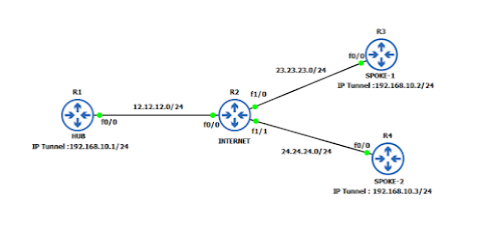
HUB

HUB(config)#router ospf 12
HUB(config-router)#network 1.1.1.1 0.0.0.0 area 0
HUB(config-router)#network 192.168.10.0 0.0.0.255 area 0
HUB(config-router)#exit
HUB(config)#int tun0
HUB(config-if)#ip ospf network broadcast

SPOKE 1

 Spoke-1(config)#router ospf 12
Spoke-1(config-router)#network 2.2.2.2 0.0.0.0 area 0
Spoke-1(config-router)#network 192.168.10.0 0.0.0.255 area 0
Spoke-1(config-router)#exit
Spoke-1(config)#int tun0
Spoke-1(config-if)#ip ospf network broadcast

SPOKE 2

Spoke-2(config)#router ospf 12
Spoke-2(config-router)#network 192.168.10.0 0.0.0.255 area 0
Spoke-2(config-router)#network 3.3.3.3 0.0.0.0 area 0
Spoke-2(config-router)#exit
Spoke-2(config)#int tun0
Spoke-2(config-if)#ip ospf network broadcast

Cek ping 

HUB

HUB#ping 2.2.2.2
Type escape sequence to abort.
Sending 5, 100-byte ICMP Echos to 2.2.2.2, timeout is 2 seconds:
!!!!!
Success rate is 100 percent (5/5), round-trip min/avg/max = 18/22/41 ms

Cek traceroute

SPOKE 1

Spoke-1#traceroute 192.168.10.3
Type escape sequence to abort. Tracing the route to 192.168.10.3
VRF info: (vrf in name/id, vrf out name/id)
1 192.168.10.3 76 msec 52 msec 56 msec 


phase 3 with eigrp

 phase 3 with eigrp


HUB

HUB(config)#router eigrp 12
HUB(config-router)#network 1.1.1.1 0.0.0.0
HUB(config-router)#network 192.168.10.1 0.0.0.0
HUB(config-router)#no auto-summary
HUB(config-router)#exit
HUB(config)#int tun0
HUB(config-if)#no ip split-horizon eigrp 12

SPOKE 1

Spoke-1(config-if)#router eigrp 12
Spoke-1(config-router)#network 2.2.2.2 0.0.0.0
Spoke-1(config-router)#network 192.168.10.2 0.0.0.0
Spoke-1(config-router)#no auto-summary

SPOKE 2

Spoke-2(config)#router eigrp 12
Spoke-2(config-router)#network 3.3.3.3 0.0.0.0
Spoke-2(config-router)#network 192.168.10.3 0.0.0.0
Spoke-2(config-router)#no auto-summary

Cek ping

SPOKE 1

Spoke-1#ping 1.1.1.1
Type escape sequence to abort.
Sending 5, 100-byte ICMP Echos to 1.1.1.1, timeout is 2 seconds:
!!!!!
Success rate is 100 percent (5/5), round-trip min/avg/max = 06/16/21 ms 

phase 3 with dmvpn

 phase 3 with dmvpn


 HUB

HUB(config)#int tun0
HUB(config-if)#ip nhrp redirect
HUB(config-if)#ex

SPOKE 1

HUB(config)#int tun0
HUB(config-if)#ip nhrp redirect
HUB(config-if)#exit

Kita verifikasi 

HUB

HUB#show dmvpn
Legend: Attrb --> S - Static, D - Dynamic, I - Incomplete
        N - NATed, L - Local, X - No Socket
        # Ent --> Number of NHRP entries with same NBMA peer
NHS Status: E --> Expecting Replies, R --> Responding, W --> Waiting


Interface: Tunnel0, IPv4 NHRP Details
Type:Hub, NHRP Peers:2,
# Ent Peer NBMA Addr Peer Tunnel Add State UpDn Tm Attrb  
----- --------------- --------------- ----- -------- -----
1 23.23.23.1...........................192.168.10.2 UP 00:45:14 D
1 24.24.24.1                                 192.168.10.3 UP 00:44:25 D 

Kita cek ping

HUB

HUB#ping 192.168.10.2
Type escape sequence to abort.
Sending 5, 100-byte ICMP Echos to 192.168.10.2, timeout is 2 seconds:
!!!!!
Success rate is 100 percent (5/5), round-trip min/avg/max = 09/12/24 ms 

phase 2 with ospf

 phase 2 with ospf


R3

HUB(config)#router ospf 12
HUB(config-router)#network 1.1.1.1 0.0.0.0 area 0
HUB(config-router)#network 192.168.10.0 0.0.0.255 area 0
HUB(config-router)#exit
HUB(config)#int tunnel 0
HUB(config-if)#ip ospf network broadcast

R2

Spoke-1(config)#router ospf 12
Spoke-1(config-router)#network 2.2.2.2 0.0.0.0 area 0
Spoke-1(config-router)#network 192.168.10.0 0.0.0.255 area 0
Spoke-1(config-router)#exit
Spoke-1(config)#int tun0
Spoke-1(config-if)#ip ospf network broadcast

Spoke-2

Spoke-2(config)#router ospf 12
Spoke-2(config-router)#network 192.168.10.0 0.0.0.255 area 0
Spoke-2(config-router)#network 3.3.3.3 0.0.0.0 area 0
Spoke-2(config-router)#exit
Spoke-2(config)#int tun0
Spoke-2(config-if)#ip ospf network broadcast

Selanjutnya kita lakukan ping pada di setiap router

R3

HUB#ping 2.2.2.2
Type escape sequence to abort.
Sending 5, 100-byte ICMP Echos to 2.2.2.2, timeout is 2 seconds:
!!!!!
Success rate is 100 percent (5/5), round-trip min/avg/max = 36/46/56 ms

HUB#ping 3.3.3.3
Type escape sequence to abort.
Sending 5, 100-byte ICMP Echos to 3.3.3.3, timeout is 2 seconds:
!!!!!
Success rate is 100 percent (5/5), round-trip min/avg/max = 32/44/56 ms


LAB 1 FORTIGATE BASIC KONFIG

BASIC KONFIG FORTIGATE     Assalamualaikum Warahmatullahi Wabarakaatuh.....       Yaa...  jadi kali ini saya akan menjelaskan tutorial basic...